2008年1月23日
Office 2000 的符號表安裝檔何處尋
在 Office 2000 原版光碟中的 MSIME 目錄下執行 setup.exe,
勾取 Microsoft Office 2000 的輔助工具,就可以在 Word, Excel 和 PowerPoint 看到符號表。
此外,安裝完畢之後,會在 Excel 和 Powerpoint 的 [插入] 功能表出現 [,特殊符號] 的選項


2008年1月22日
如何在 Windows 2000 使用 Windows Server 2003 原生的印表機驅動程式
欲在 Windows 2000 使用 Windows Server 2003 原生的 unidriver 印表機驅動程式,請依照下列步驟進行操作:
- 在 Windows 2000 中,開啟「命令提示字元」,鍵入如下的指令來停用 Spooler:
net stop spooler - 切換到 Windows 2000 inf 目錄:
cd %systemroot%\inf - 將 ntprint.inf 更名為 ntprint.inf.old,並刪除 ntprint.pnf
- 建立一個子目錄:
md C:\w2k3_drv\i386 - 從 Windows Server 2003 CD 的 i386 目錄將 driver.cab 複製到上個步驟所建立的子目錄裡,並更名成 pdriver.cab:
請特別注意,記得要更名哦!
copy D:\i386\driver.cab C:\w2k3_drv\i386\pdriver.cab - 接著從 Windows Server 2003 CD 的 i386 目錄將 ntprint.inf 複製到 Windows 2000 的 inf 子目錄裡:
copy D:\i386\ntprint.inf C:\Winnt\inf - 編輯上個步驟所複製的 ntprint.inf 檔,找到如下的地方:
將原本的 %WinNET2003% 換成 C:\w2k3_drv,置換完成之後的結果如下所示:
[SourceDisksNames.x86]
1 = %WinNET2003%,driver.cab,,"I386"

[SourceDisksNames.amd64]
1 = %WinNET2003%,driver.cab,,"Amd64"

[SourceDisksNames.ia64]
1 = %WinNET2003%,driver.cab,,"Ia64"[SourceDisksNames.x86]
1 = %C:\w2k3_drv,driver.cab,,"I386"
[SourceDisksNames.amd64]
1 = C:\w2k3_drv,driver.cab,,"Amd64"
[SourceDisksNames.ia64]
1 = C:\w2k3_drv,driver.cab,,"Ia64" - 鍵入如下的指令來啟用 Spooler:
net start spooler - 接著請新增印表機,此時便會自動使用 Windows Server 2003 的 unidriver 與 Postscript 驅動程式。
2007年11月17日
如何清空 SQL Server Management Studio 登入畫面的伺服器清單
SQL Servr Management Studio 為方便大家連線 SQL Server,特別在登入畫面中提供一個伺服器下拉清單。
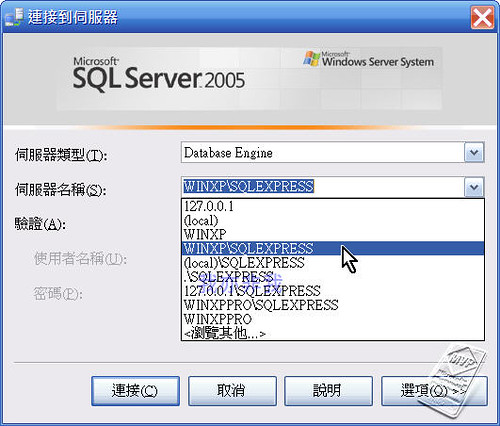
如果您要清空這個清單,可以刪除如下所列的檔案:
%USERPROFILE%\Application Data\Microsoft\Microsoft SQL Server\90\Tools\Shell\mru.dat 一般來說,非 Windows Vista 作業系統的 %USERPROFILE% 會在 C:\Documents and Settings\<使用者帳戶>
請注意: 於刪除檔案之前,請確認您已經有那些伺服器的 IP 位置或伺服器名稱、帳戶與密碼…等相關資訊。
2007年10月25日
如何重新設定 Office 2007 產品金鑰
當您所使用的 Office 2007 經過 微軟網站的驗證 確定為非正版軟體時,可以使用下列方式來變更產品金鑰,而無須重新安裝 Office 2007:
- 關閉所有的 Office 應用程式。
- 從[開始]->[執行]->輸入[regedit]->[確定]
- 找到下列機碼:
或許您在 Registration 之後的內容跟我的不同,那是因為所安裝的 Office 2007 不同版本所造成的,茲將相關版本的內容列示如下: Microsoft Office 2007 Professional Plus
HKEY_LOCAL_MACHINE\Software\Microsoft\Office\12.0\Registration\{91120000-0011-0000-0000-0000000FF1CE}- {90120000-0011-0000-0000-0000000FF1CE}
- {91120000-0011-0000-0000-0000000FF1CE}
- {90120000-0014-0000-0000-0000000FF1CE}
- {91120000-0014-0000-0000-0000000FF1CE}
- {90120000-002E-0000-0000-0000000FF1CE}
- {91120000-002E-0000-0000-0000000FF1CE}
- {90120000-0030-0000-0000-0000000FF1CE}
- {91120000-0030-0000-0000-0000000FF1CE}
- {90120000-0031-0000-0000-0000000FF1CE}
- {91120000-0031-0000-0000-0000000FF1CE}
- {90120000-0035-0000-0000-0000000FF1CE}
- {91120000-0035-0000-0000-0000000FF1CE}
- 刪除下列兩機碼: DigitalProductID ProductID
- 開啟任何一個 Office 2007 應用程式,此時便會出現輸入產品金鑰的對話方塊,請依照畫面指示,輸入新的產品金鑰,並完成後續幾個畫面操作。
2007年10月6日
如何在 Visual Studio 2008 Beta2 中,開啟 .xaml 檔案
欲在 Visual Studio 2008 Beta2 中,於 Project Exproler 中,當選擇某個 .xaml 檔案,然後按下滑鼠右鍵以便出現 Open in Expression Blend,
請確認已經安裝 Microsoft Silverlight Tools Alpha for Visual Studio 2008 Beta 2,此外建議安裝最新版的 Expression Blend 2 (目前最新版為
September Preview)
訂閱:
文章 (Atom)